.png)


Less Prep.
More Possibilities.
-
Free for 5 years with education purchases of LiteTouch interactive panels
-
Windows, Mac, Android, and web access
-
Touch-friendly whiteboarding
-
Thousands of editable lessons and activities
-
Classroom tools, games, and quizzes
-
Built-in AI for lesson preparation
-
Cloud lesson storage and sharing


Write. Explore.
Bring Lessons to Life.
Turn your interactive display into a flexible teaching canvas. Write, draw, highlight, and annotate documents with tools designed for touch. Handwriting and shape recognition help keep ideas clear, while images, videos, maps, and interactive objects make concepts easier to explore. From a quick explanation to a complete lesson, Enliten puts everyday teaching tools within reach.
Ready-Made Lessons.
Made Your Own.
Start with thousands of editable lessons, templates, and activities across math, reading, science, social studies, and social-emotional learning. Adapt content to your curriculum and your students, then add games or brain breaks to keep the class engaged. Timers, name pickers, seating charts, and other classroom tools help you manage the moments between instruction, too.

Built-in AI.
More Time to Teach.
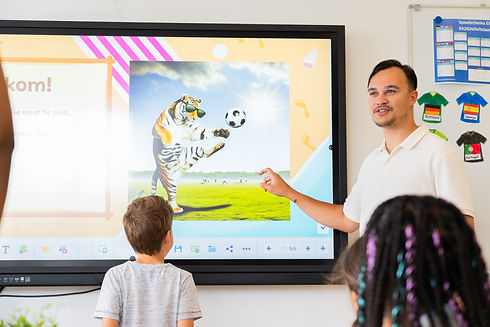
Give lesson preparation a helping hand with AI tools built directly into Enliten. Generate images from a short prompt, create multiple-choice quizzes with answer options, and turn written text into spoken audio in multiple languages. Create visuals for a new topic, prepare a quick review, or support learners who benefit from hearing lesson text aloud, all within your teaching workspace.
Prepare Anywhere.
Teach Together.
Prepare lessons at home and pick up where you left off in the classroom. Cloud storage keeps saved lessons available across devices, while shared folders support planning with colleagues. Import resources from Google Drive or OneDrive, share lessons through Google Classroom, and invite students to join quizzes and live activities from their own devices. Offline support keeps core teaching tools available when your connection is interrupted.

A COMPLETE TEACHING TOOLKIT
At a glance
-
Touch-friendly whiteboarding and document annotation
-
Editable lessons and activities across core subjects
-
20,000+ educational images in the built-in library
-
AI image generation, quizzes, and text-to-speech
-
Classroom tools, games, and student participation
-
Cloud lesson storage and sharing with colleagues
-
Google Drive, OneDrive, and Google Classroom integrations
-
Apps and browser access, with offline support